

The browser became the workplace. It also became the attack surface.
Staff paste sensitive data into AI chatbots and get tricked by pages the perimeter never sees. The Universal Sensor is being extended into the browser to stop both.
Two things are happening inside the tab that your stack was not built to watch.
Data walking out, and attacks walking in. One extension, part of the sensor you already run, is designed to see both.

Shadow AI and data leakage
It will detect sensitive content, an API key, a credential, a project codename, being entered into an AI chat window and warn the user in the moment. The user removes the text and carries on. It is designed to guide rather than obstruct.

Malicious and rogue destinations
It will block access to known-bad AI and SaaS domains at the network layer, using the browser's declarativeNetRequest engine, before the page loads. This runs below page JavaScript, which is designed so a page cannot unhook it.

ClickFix and browser-borne social engineering
It will recognise the fake-verification lure and neutralise it: blurring the pop-up, overlaying a warning and disabling interaction, so the user cannot be tricked into the next click. The execution stage is covered by the Universal Sensor on the endpoint.
Analysis will happen on the device. Only the verdict will leave.
We will not ship your employees' conversations to a cloud to inspect them. This is a deliberate design choice, not a setting, and it is the line a DPO can repeat.
Content never leaves by default
All content analysis will run in the browser on the user's machine. Only a verdict will be transmitted. Where a customer explicitly opts in, a minimal redacted snippet may accompany a confirmed violation.
Domains, not URLs
URLs will be reduced to the registrable domain at the point of capture, before any event is built.
Identity you choose
User identity will be configurable per deployment: full email, domain only, or anonymous.
Bounded, predictable rules
Detection will use deterministic rules, keywords and built-in secret and credential patterns, which keeps on-device analysis fast and explainable.
Built for the DPIA
The customer is the data controller; SenseOn processes on their behalf; content will not be reused for model training. This is the design intended to support UK GDPR processor terms and European works-council processes.
Same pipeline, one investigation
Verdicts will flow in OCSF into the pipeline the endpoint and network sensors already use, so a browser lure and the process it would have spawned will appear as one story.
You hold the dial.
The extension will carry a small, fixed, audited set of capabilities: detect, warn, block an action, neutralise a page element, and log. Your security team will decide how they are applied, per rule and per tenant.
Warn is the default
Per-rule action: log, warn or block. Warning will be on from day one; nothing will block until an administrator decides it should.
Two independent opt-ins before anything blocks
A per-tenant master switch will keep blocking off until deliberately turned on. A rule set to block will be honoured as warn until then. Nothing blocks by accident.
Fails open, audited, reversible
A malformed or stale rule set will apply nothing rather than over-blocking. A fleet-wide kill switch will always be available. Every enable and every escalation to block will be an audited configuration change. Configuration will only actuate capabilities already compiled into the reviewed build; no code will be loaded remotely.
One lightweight extension, and how blocking will work
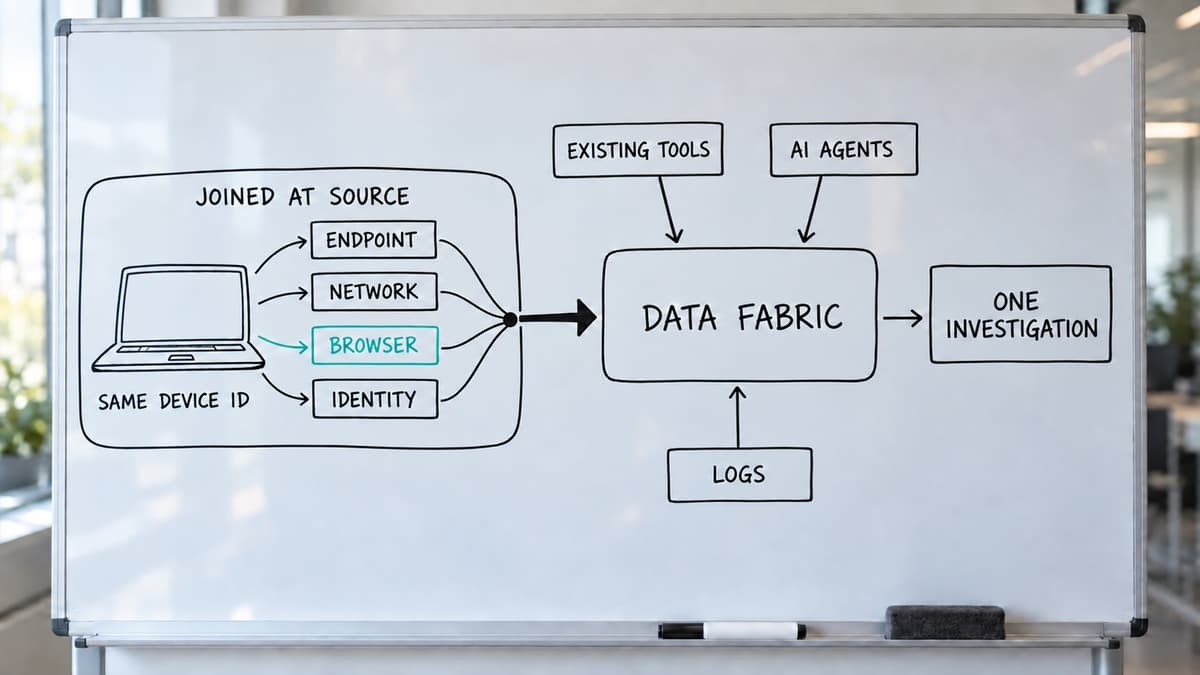
The Universal Sensor already unifies identity, endpoint and network DPI telemetry at source on each device. The browser coverage adds a fourth vantage point to that same agent: a Chrome extension built on Manifest V3, force-installed and managed through your existing enterprise browser policy (Google Admin, Intune or GPO). It is not a consumer add-on and it is not a replacement browser: your staff keep the browser they already use.
Each install will enrol through an authenticated handshake and emit telemetry in OCSF into the same SenseOn pipeline the endpoint and network sensors already use. There is no new ingestion stack to run, and browser signal will correlate with endpoint, network and identity in the same investigation, so a browser lure and the process it spawns appear as one story, not two.
One extension build will serve every customer. Behaviour is set entirely by server-delivered configuration, never by shipping custom code per customer.
How blocking will work
In the page, running in the extension's isolated world so a hostile page cannot strip it out:
- Composer mode blocks only the send action while leaving the text field editable, so the user removes the sensitive content and carries on.
- Modal mode blurs the element, overlays a warning and disables all interaction, for a malicious pop-up where there is nothing legitimate to preserve.
Send-path coverage for the composer is layered: keyboard (intercepting Enter while preserving Shift+Enter and non-Latin input composition), interface (the send button and other click paths), and programmatic (inspecting outbound requests to catch sends issued by page scripts or by a browser-driving AI agent, not just clicks and keystrokes).
At the network layer, known-malicious AI, SaaS and lure domains are blocked before the page loads. This is content-blind: it blocks by domain, not by individual message.
Permissions, honestly
Minimal by default. The base sensor requests no broad page access. Blocking known-bad domains adds a single, well-scoped network-blocking permission. Neutralising lures on arbitrary pages requires broader page access, which is exactly why it is a deliberate, gated capability rather than on by default. Breadth of protection and breadth of permission are traded consciously and transparently.
Every cell from the vendor's own documentation
Every cell below comes from the vendor's own documentation or announcement, read on 19 September 2026; the sources are listed under the table. "Not documented" means the vendor publishes no claim, not that the capability is absent.
| Inline SSE / network DLP (Zscaler, Netskope, Palo Alto, Cisco, Cloudflare) | CASB discovery (Defender for Cloud Apps) | Endpoint DLP (Purview, CrowdStrike, Symantec) | Replacement enterprise browser (Island, Prisma Browser) and browser licences (Chrome Enterprise Premium, Edge + Purview) | Browser extension sensors (Push, LayerX, Keep Aware, Harmonic, Menlo, Nightfall) | SenseOn Universal Sensor in the browser | |
|---|---|---|---|---|---|---|
| Sees a paste into an AI chat | Yes, but only when the device is steered through the vendor's cloud proxy with TLS decryption on for the AI category | No. Sees the domain and category; blocks unsanctioned AI apps by domain | Yes, in supported browsers only. Purview: Edge built in; Chrome needs a Windows-only extension; macOS paste control in preview. Symantec: Chrome and Edge clipboard only | Yes. Island inspects at the DOM layer; Prisma's Typing Guard covers basic HTML fields only; Chrome Enterprise Premium triggers on paste, not typing; Edge + Purview covers typing and prompts | Yes, all six | Designed to, on device, on supported AI assistants |
| Where the content is inspected | In the vendor cloud. Netskope: "inspect every prompt and response in real time"; Cloudflare holds prompts in memory and can store matches encrypted | Not inspected | On the device for basic patterns; Purview sends content to the cloud for advanced classification and evidence copies | In the cloud for Chrome Enterprise Premium ("uploaded to Google Cloud for analysis") and Edge + Purview ("policy evaluation always occurs in the cloud"). Island and Prisma say in-browser; neither documents what leaves the device | Varies, and it matters: Harmonic's docs say the extension "does not analyze prompts locally" and stores prompt text for 180 days; Menlo replicates the session in its cloud; Push sends metadata plus, by default, ClickFix clipboard payloads; LayerX says only alerts leave the browser | On the device. Only the verdict will leave; raw content will not be transmitted or stored by default |
| Stops a ClickFix lure before the paste | No. Blocks known domains and sandbox-flagged payloads. Palo Alto's crawlers detect clipboard-injected commands offline and then block the URL | No | No. Detects the PowerShell after execution; Edge SmartScreen warns on known landing pages | Prisma Browser names ClickFix (Live Page Scanning, must be enabled). Chrome Enterprise Premium is adding a copy-event trigger for it. Island, Edge and Zscaler's browser: not documented | Push (named feature; monitor mode by default; replaces the clipboard payload in warn or block mode; not on Firefox), Keep Aware (wipes the clipboard at copy time). LayerX, Harmonic, Nightfall: not documented | Designed to: known lure domains blocked before load; unknown lures neutralised in the page (blurred, warning overlaid, interaction disabled) |
| Requires a new browser | No | No | No | Yes for Island and Prisma Browser; no for Chrome Enterprise Premium (a licence on Chrome) and Edge | No | No |
| Default posture | No shipped default; a paste is allowed until an admin writes a rule. Actions are allow, alert, coach or block | Alert by default; block is an opt-in tag with up to three hours' latency | Audit or test mode first; block is a policy setting | Admin-configured; no vendor states a default. Edge + Purview is off until a policy exists | Monitor by default where stated (Push, Nightfall, Harmonic) | Warn by default; block will need two independent opt-ins (per rule and per tenant) |
| Browser, endpoint and network in one investigation | No native endpoint telemetry; SIEM or partner export (Palo Alto via a separate Cortex licence) | Yes, within Defender XDR | Purview via Defender XDR and CrowdStrike natively; Symantec via export | Island: SIEM export. Prisma: via Cortex XSIAM. Edge + Purview: Defender XDR | No. All six export to a SIEM or webhook; none shows browser, endpoint and network in one investigation | Designed to: same pipeline as the endpoint and network sensors, shared device identity, one investigation |
Sources (all read 19 Sep 2026): Zscaler GenAI data protection deployment guide and AI Access Security page; Netskope "Securing generative AI" and SSL decryption docs; Palo Alto "Introducing AI Access Security" (24 Aug 2026) and Unit 42 "Preventing ClickFix" (10 Jul 2025); Cisco Secure Access DLP guide (19 Aug 2024); Cloudflare One DLP docs (11 Sep 2026) and "AI prompt protection" (25 Aug 2025); Microsoft Learn "Manage generative AI apps" (8 Apr 2026), "Govern discovered apps with Defender for Endpoint" (3 Jul 2026), Purview "Restrict paste in browsers" (26 Jun 2026), "Learn about Endpoint DLP" (5 Aug 2026), "Browser DLP in Edge for Business" (15 Sep 2026); Microsoft Security blog "Think before you Click(Fix)" (21 Aug 2025); CrowdStrike "Stops GenAI data leaks" (18 Sep 2025); Broadcom KB 261794; Island "Enterprise DLP for generative AI" (29 Jun 2026); Palo Alto Prisma Browser DLP and Live Page Scanning docs (10 Sep 2026); Google "Protect Chrome users with Chrome Enterprise Premium" and Chrome Enterprise release notes; Push Security "ClickFix protection" and help centre; Akamai Workforce Protector (LayerX) solution brief; Keep Aware "What is ClickFix" (24 Sep 2025); Harmonic Security docs "Frequently asked questions" and "Data storage and residency"; Menlo Security "How to prevent ClickFix attacks" (30 Jul 2026); Nightfall automated-action docs.
- What is browser detection and response?
- Detecting and acting on threats and data loss at the point they occur inside the browser, as distinct from network or endpoint controls that see the browser only from outside. SenseOn is designed to provide it as part of the Universal Sensor rather than as a separate product.
- Is this an enterprise browser?
- No. It is an extension for the managed browser your staff already use. Enterprise browsers replace the browser; this adds a sensor to it.
- Will SenseOn read my employees' AI conversations?
- No, by design. Analysis will happen on the device and only a verdict will leave the browser. By default, raw content will not be transmitted or stored; a redacted snippet accompanies a confirmed violation only where the customer has explicitly opted in.
- Does it make data leaks impossible?
- No control does. It warns on, and can block, the obvious paths: pasting into an AI composer in the browser. A determined user can still copy text elsewhere. It is strong defence in depth, not a guarantee.
- Which browsers?
- Managed Chrome, via Manifest V3.

See the browser sensor alongside the rest of the platform
One sensor for endpoint, network and the browser. Verdicts, not conversations. Warn first, block when you say so.