

Shadow AI is the use of AI tools, models or browser extensions by employees without the knowledge or approval of IT or security. In practice, staff paste source code, customer records and credentials into ChatGPT, Claude, Gemini and whichever tool launched last week, from a browser tab none of your controls can see inside.
The UK's National Cyber Security Centre defined it in September 2026: "Shadow AI describes the use of AI technology which isn't captured in an organisation's approved systems and processes." It cited a Microsoft UK study in which 71% of employees said they use AI tools their employer has not approved. The NCSC's title, "The hidden risks of shadow AI", is right in one way: the risk is hidden from the tools you already own. Network DLP sees an encrypted session. Endpoint agents see a browser process. Cloud access brokers see a domain. None of them sees the paste.
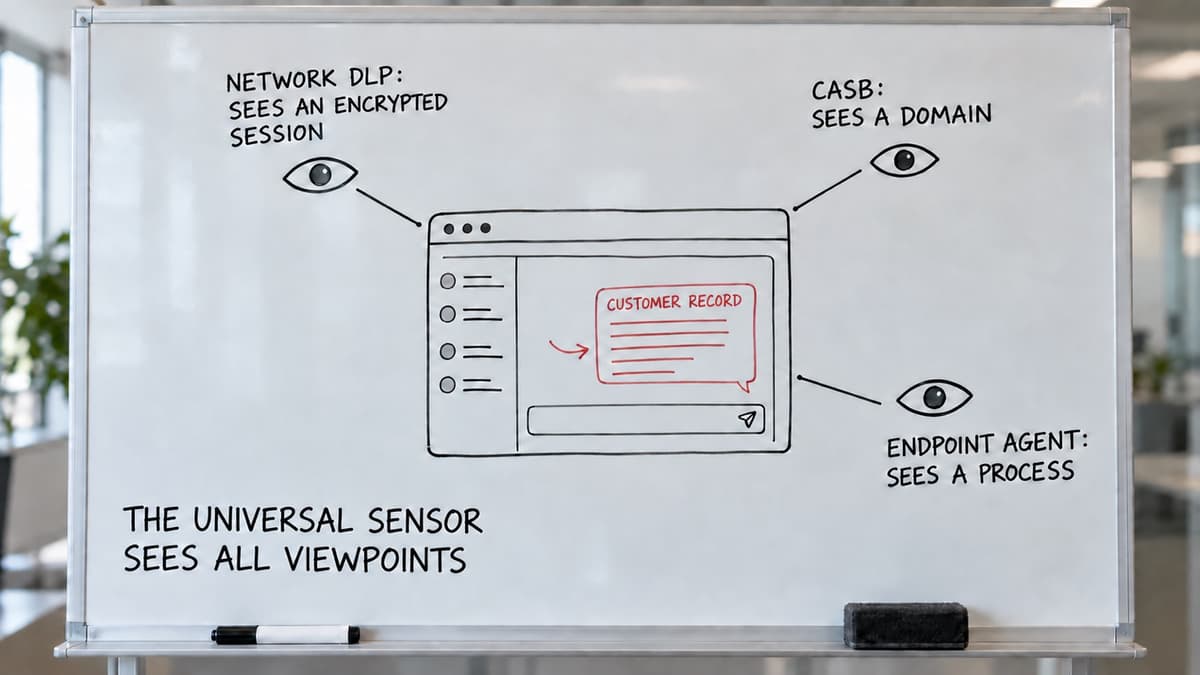
What each control sees, and the browser viewpoint the Universal Sensor adds.
What is shadow AI?
Shadow AI is the AI form of shadow IT: technology adopted by employees outside the organisation's governance. A survey of 140 employees and interviews with 10 executives found formal AI governance lagging behind what staff actually do, a gap the authors call a "governance drift zone" (Silić et al., Strategic Change, 2025). Three things make it worse than last decade's SaaS sprawl.
- The input is the data. A shadow SaaS app holds what you type in a form. A chat assistant takes whatever you paste, and the fastest way to a useful answer is the real thing: the contract, the log, the customer email.
- It is free and instant. No procurement, no install, no admin: a work email and a browser tab.
- The tool set changes weekly. Blocking three domains was a strategy in 2023, not now.
Is ChatGPT shadow AI? Not by itself. Under an enterprise agreement, with data terms your DPO signed off, it is sanctioned AI. Through a personal account on a work laptop, with default data settings, it is shadow AI. Same tool; different governance.
What actually leaks
Public incidents and security teams report the same pattern, in rough order of frequency:
- Source code. Developers paste functions to debug, refactor or document. The best-known case is Samsung in 2023: engineers pasted proprietary code into ChatGPT and Samsung restricted the tool afterwards (Bloomberg, May 2023). Code often carries embedded secrets: a longitudinal scan of public GitHub found thousands of new, unique secrets leaked every day, across more than 100,000 repositories (Meli et al., NDSS, 2019).
- Credentials and API keys. Usually by accident, inside a config file, a log excerpt or an error message pasted whole.
- Customer records. Support and sales staff paste a ticket, an email thread or a CRM export to draft a reply or summarise a case.
- Commercial and legal documents. Contracts, board papers and financial models pasted for summary or redrafting.
- Project codenames and unannounced plans. Low volume, high consequence.
The person is almost never malicious; they want to work faster. The sensitive part is usually a fraction of the paste: one key, one name, one clause. The people it protects will fight any control that treats the whole paste as the problem.
What the risks are
What are the risks of shadow AI? Four, in the order a board asks.
- Data leakage. Content pasted into a consumer AI tool may be retained, used to improve models, visible to the vendor's staff, or exposed in a vendor breach. In July 2025 Fast Company found around 4,500 shared ChatGPT conversations in Google search results; a researcher later scraped nearly 100,000, including NDAs and confidential contract discussions. Users had ticked a "make this chat discoverable" option when sharing a link. OpenAI removed the option within days and called it "a short-lived experiment" (Fortune, 5 August 2025).
- Regulatory exposure. The ICO defines a personal data breach as "a breach of security leading to the accidental or unlawful destruction, loss, alteration, unauthorised disclosure of, or access to, personal data", and lists sending personal data to an incorrect recipient as one type. Pasting a customer's details into a consumer AI tool with no processor terms fits that definition. Then you assess. If the breach is likely to result in a risk to people's rights and freedoms, you must report it to the ICO "without undue delay, but not later than 72 hours after becoming aware of it". If the risk is unlikely, you must document why you did not report. Either way you first need to know it happened, and most organisations cannot.
- Contractual exposure. Customer contracts and NDAs routinely forbid sharing their content with third parties. An AI vendor is a third party.
- Security exposure. In reverse: a malicious or compromised AI tool, or a lure dressed as an AI onboarding step, is now a recognised initial-access route. The ClickFix family includes AI-tool onboarding lures aimed at organisations with public AI initiatives.
Why the tools you already have cannot see it
| Control | What it sees | What it misses |
|---|---|---|
| Network DLP / secure web gateway (Zscaler, Netskope, Palo Alto, Cisco, Cloudflare) | The prompt, after decrypting the session in the vendor's cloud. Each vendor's DLP documentation describes cloud-side inspection; Cloudflare's states DLP "requires Gateway HTTP filtering with TLS decryption" | Devices not steered through the proxy; and the prompt is processed in the vendor's cloud |
| CASB / SaaS discovery (Defender for Cloud Apps) | Which AI domains are in use, by whom, how often; can block unsanctioned domains | Whether anything sensitive went in |
| Endpoint DLP (Microsoft Purview, Symantec, CrowdStrike) | A paste into an AI site, in supported browsers. Microsoft Learn (26 Jun 2026): Purview in Edge natively, in Chrome via a Windows-only extension, macOS paste control in preview. Broadcom's knowledge base: Symantec monitors clipboard "in Chrome or Edge browsers" only | Unsupported browsers and platforms; Microsoft Learn states that Purview's advanced classification and evidence collection use the cloud service |
| Domain blocking | Traffic to the AI domains on your block list | Any AI tool not yet listed; and staff signing in to a listed tool with a personal account, which a domain block cannot tell from the sanctioned one |
| Enterprise browser (Island, Prisma Browser) | Everything typed or pasted, in principle. Island's documentation says data "can be inspected before it ever leaves the browser"; Palo Alto's says Prisma Browser's data controls use its cloud Enterprise DLP profiles | Adoption: staff keep the browser they have, and it is a second browser to run |
| Browser extension sensors (Push, LayerX, Harmonic, Nightfall, Menlo) | The paste, at the point it happens, in the browser the staff already use | Privacy varies sharply, in the vendors' own words: Harmonic's documentation says the extension "does not analyze prompts locally" and stores prompt text for 180 days; Menlo's says "the Menlo architecture replicates each browser session in the Menlo Cloud"; LayerX's says "the only data that is sent to the LayerX cloud is alerts" |
| SenseOn Universal Sensor: identity, endpoint, network DPI and now the browser, unified at source on the device | The paste, analysed on the device with only the verdict leaving, joined at source to the device's process, network and sign-in telemetry: a credential pasted into an AI chat and an odd sign-in ten minutes later are one case | The user's intent. A determined person can still retype or photograph text; the sensor sees the browser paste and everything around it on the device, not the person |
To see a paste into an AI chat you have to be in the tab. What you do there is a privacy question before it is a security one.
The dated vendor source list is on the browser sensor page.
The privacy problem with "inspect everything"
Some products send what the user typed to a cloud service and inspect it there. For a UK or European employer that is a poor answer.
- The employer reads employees' words, including personal ones, in a tool they may also use for personal tasks.
- It creates a second copy of every sensitive paste, in a second vendor: the problem you set out to solve.
- It is the design a works council or DPO will challenge first, and the hardest to justify in a DPIA, because a less intrusive means exists.
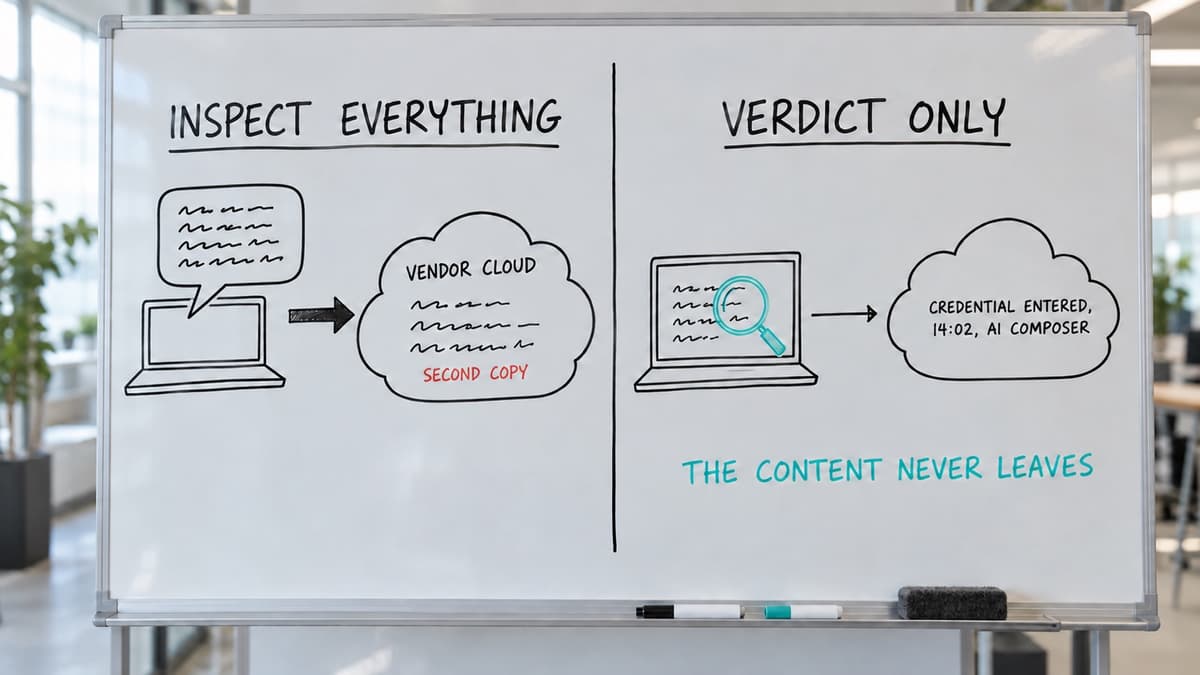
How the browser extension works: the analysis runs on the device and only a verdict leaves it.
That less intrusive means is on-device analysis. The browser on the employee's machine checks the text against a bounded set of rules (secret and credential patterns, sensitive keywords), and only the verdict leaves: "a credential-shaped string was entered into an AI composer on this domain at this time." The employer learns that something happened, not what was said. Under UK GDPR that is the difference between monitoring you can show to be necessary and proportionate and blanket surveillance, and the strongest line a DPIA for this control can carry.
What the Universal Sensor will do in the browser
SenseOn is extending the Universal Sensor into the browser. The sensor is already one agent unifying identity, endpoint and network DPI telemetry at source on each device; the browser becomes its fourth vantage point, through a managed extension deployed by your existing enterprise browser policy. For shadow AI it is designed around three choices.
Private by design. All content analysis will run on the device. Only a verdict will leave the browser. Where a customer opts in, a minimal redacted snippet may accompany a confirmed violation; by default, raw content will not be transmitted or stored. URLs will be reduced to the registrable domain before any event is built. User identity will be configurable per deployment: full email, domain only, or anonymous. This is a design choice, not a setting.
Guide, do not obstruct. When someone enters a credential, API key, project codename or other sensitive content into an AI chat window, the sensor will warn them in the moment. In composer mode it will block only the send action and leave the text editable, so the user removes the offending line and carries on. Warning is the default; the security team turns blocking on deliberately, per tenant, and can turn it off again. Nothing enforces silently.
Centrally controlled, both directions. Rules will be set centrally: "warn anyone pasting a credential into an AI chat", "block this known-malicious AI domain". Known-bad AI and SaaS destinations will be blocked at the network layer before the page loads. The same sensor will watch threats coming in through the browser, so a data-leak warning and a lure neutralisation will land in the same SenseOn investigation alongside endpoint, network and identity signals.
Telemetry will flow in OCSF into the existing SenseOn pipeline: no new stack to run, no new vendor holding a copy of your data.
How to avoid shadow AI: a five-step programme
How to avoid shadow AI? You cannot, and the organisations that try end up with more of it. Govern it instead. A three-wave survey of 773 workers found persistent gaps in employee awareness and in organisational controls, and concluded that everyday AI use embeds routine disclosure risk beyond what traditional IT security covers (Sebastian, Technological Forecasting and Social Change, 2026).
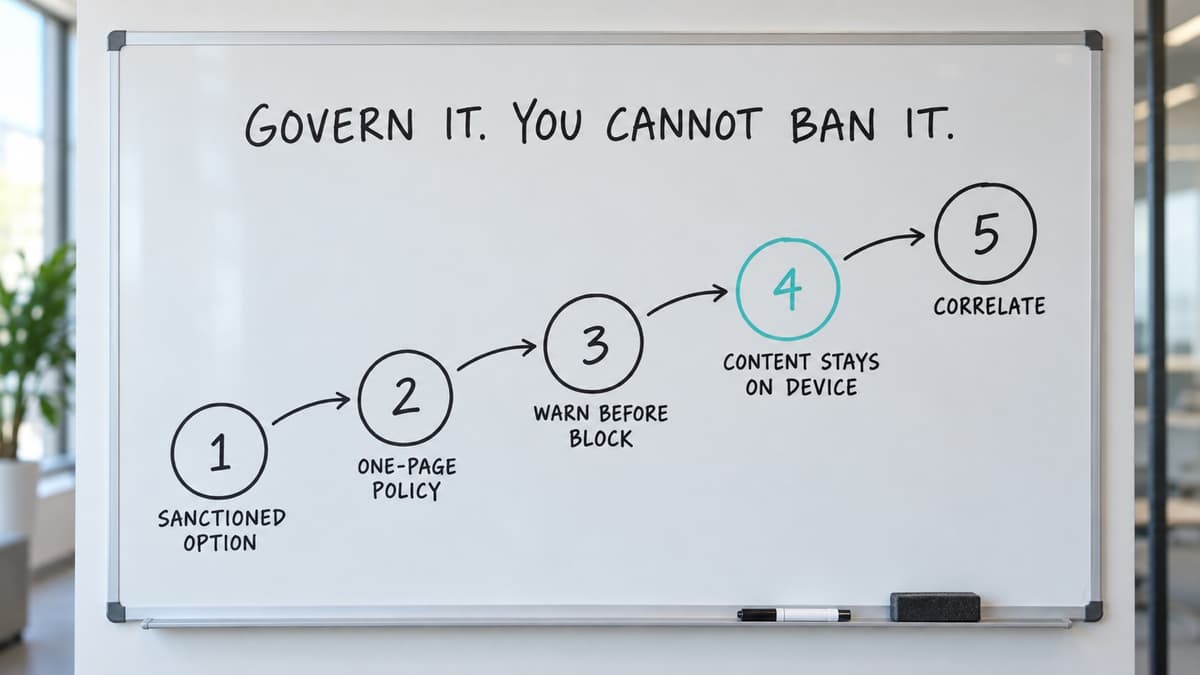
Five steps to govern shadow AI without banning the tools people rely on.
- Provide a sanctioned option. An enterprise AI agreement with DPO-approved data terms removes most of the reason to go around you.
- Write an AI acceptable use policy people can follow. One page: what is allowed, what is not, and the one rule that covers most cases: never paste customer data, credentials or unreleased code into a tool not on the approved list.
- See before you block. Deploy any control in warn-only mode first and measure for a full business cycle. The volume and categories of what staff paste will change the policy.
- Keep the content on the device. Choose controls that analyse locally and export verdicts. Document that choice in the DPIA; it is its strongest line.
- Correlate. Shadow AI signal is most useful next to identity and endpoint signal. A credential warning on a machine that then shows an unusual sign-in is a different case from the warning alone.
Frequently asked questions
What is shadow AI? The use of AI tools, models or browser extensions by employees without IT or security approval. It is the AI form of shadow IT; its distinguishing risk is that the input to the tool is the organisation's own data.
What is AI shadow? The same thing; "AI shadow" and "shadow AI" are used interchangeably.
Is ChatGPT shadow AI? Only when used outside the organisation's governance, for example through a personal account with default data settings. The same tool under an enterprise agreement with approved data terms is sanctioned AI.
Can you block ChatGPT at work? You can block the domain. Staff then use a personal device, a different tool, or a personal account on a domain you allowed. Warning at the point of paste, with a sanctioned alternative, works better than a block list.
Does monitoring AI use breach employee privacy? It depends on the design. Inspecting what employees type is intrusive and hard to justify under UK GDPR when a less intrusive means exists. Analysing on the device and exporting only a verdict is that means, and the one to document in a DPIA.
Sources and further reading
- Mario Silić, Dario Silić, Kathrin Kind-Trüller, "From Shadow IT to Shadow AI: Threats, Risks and Opportunities for Organizations", Strategic Change, 2025, https://doi.org/10.1002/jsc.2682
- Glorin Sebastian, "Digital shadow AI risk theory (DART): A framework for managing data disclosure and privacy risks of AI tools at work", Technological Forecasting and Social Change, 2026, https://doi.org/10.1016/j.techfore.2026.124697 (open access)
- Michael Meli, Matthew R. McNiece, Bradley Reaves, "How Bad Can It Git? Characterizing Secret Leakage in Public GitHub Repositories", NDSS, 2019, https://www.ndss-symposium.org/ndss-paper/how-bad-can-it-git-characterizing-secret-leakage-in-public-github-repositories/ (open access)
- NCSC, The hidden risks of shadow AI (7 Sep 2026)
- ICO, Personal data breaches: a guide
- ICO, Employment practices and data protection: monitoring workers
- Fortune, "OpenAI removes ChatGPT feature after private conversations leak to Google search" (5 Aug 2025)
- SenseOn Docs, ClickFix defence guide for the AI-onboarding lure variant.
Vendor statements in the table are quoted or summarised from each vendor's public documentation, read on 19 September 2026:
- Cloudflare One DLP documentation
- Microsoft Learn, Purview endpoint DLP pages
- Broadcom knowledge base article 261794
- Island, "Enterprise DLP for generative AI"
- Palo Alto, Prisma Browser data-control documentation
- Harmonic Security documentation
- Menlo Security product pages
- LayerX, "extension vs Talon" page
How SenseOn writes, checks and corrects its content: editorial standards.
