

ClickFix is a social engineering attack in which a web page shows a fake error or verification prompt and talks the visitor into pasting a command the attacker has already copied to their clipboard. The victim runs it themselves. No file is downloaded, no vulnerability is exploited, and the first four steps happen inside a browser tab.
Most guides skip that last point. They treat ClickFix as an endpoint problem, because the pasted command runs PowerShell or Terminal, and answer with endpoint detection and user awareness. Both help. But the lure, the clipboard hijack and the instruction to paste happen in the browser, before any endpoint control sees anything. That is where the chain is cheapest to break, and where the SenseOn Universal Sensor, extended into the browser, is designed to act.
For registry artefacts, hunting queries and a thirteen-item hardening list, see the ClickFix defence guide on SenseOn Docs.
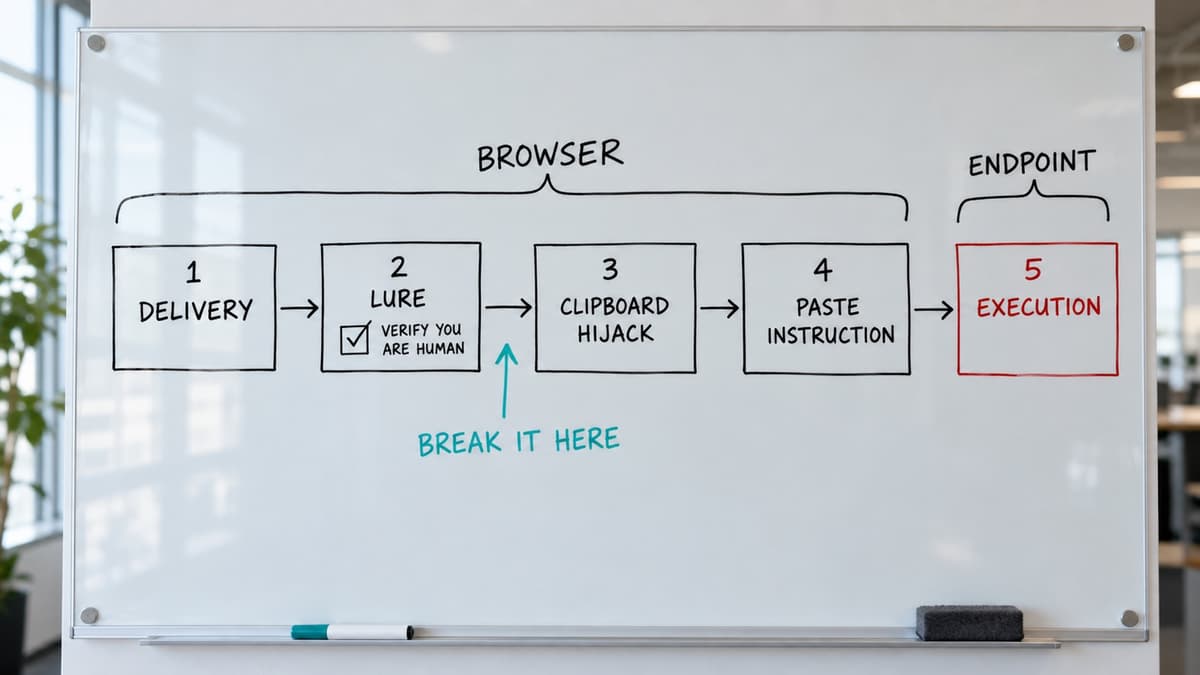
What a ClickFix attack looks like
The pattern holds whatever the lure or payload.
- Delivery. The victim lands on a page: a compromised legitimate website, a malicious advert, a phishing link, a fake download portal, or a spoofed meeting invite.
- The lure. The page shows a fake CAPTCHA ("Verify you are human"), a browser or Windows error, an "update in progress" screen, or a "this document can't be displayed" message. Cloudflare and Google reCAPTCHA branding are the most copied.
- Clipboard hijack. Ticking the box or clicking "Fix" runs JavaScript that silently copies an attacker-controlled command to the clipboard. The screen often shows harmless decoy text; the payload is in the clipboard.
- The instruction. The page tells the victim to press Win+R, open PowerShell or Terminal, paste, and press Enter.
- Execution. A trusted, signed interpreter runs the command, which usually fetches the next stage in memory.
MITRE catalogued the technique in March 2025 as ATT&CK sub-technique T1204.004, User Execution: Malicious Copy and Paste. It emerged in late 2023 on the compromised-site infrastructure tracked as ClearFake, and is now one of the most common initial-access vectors in circulation.
Why it works so well
ClickFix needs no vulnerability and no download. Because the victim runs the command with a legitimate interpreter, attachment filtering, browser sandboxing, reputation checks and file-based antivirus all sit downstream of a step that never happens. Living-off-the-land execution through binaries already on the system is a well-measured evasion technique: it appears in 9.41% of 31.8 million analysed Windows malware samples, and a test against ten popular anti-virus products found "a generalised detection gap" (Barr-Smith et al., IEEE Symposium on Security and Privacy, 2021).
It is cross-platform. The same lure works against Windows (Run dialog, PowerShell, mshta), macOS (Terminal, zsh, AppleScript) and Linux; only the interpreter changes.
And it scales. ClickFix-as-a-service kits are sold on criminal forums with CAPTCHA templates, rotating domains and a choice of payload. Most campaigns are opportunistic: the victim is compromised for visiting a hijacked page, not because they were targeted. The access is then sold on, often to ransomware operators, so containment speed matters even when the first payload is an unremarkable infostealer.
What is being seen in 2026
- Volume, and scale through the supply chain. ESET reported a 517% rise in ClickFix detections between the second half of 2024 and the first half of 2025, and UK search interest in the term has kept climbing through 2026. On 14 September attackers used a Cloudflare API key taken from the marketing platform Brevo's source code to rewrite Brevo's scripts at the CDN edge for about five and a half hours. Visitors to up to 100,000 customer websites saw a fake "Cloudflare, verify you are human" page with paste-and-run instructions (first reported by Sansec; BleepingComputer, 17 September 2026). The same day TechCrunch reported that HBO Max's verified Reddit advertising account had been hijacked to run ads leading to a fake HBO Max page. Mac and Windows users were told to paste a command into Terminal or Command Prompt, which installed an infostealer built to take passwords, sessions and cryptocurrency wallets (identified by Hudson Rock and ADAMnetworks; BleepingComputer counted 108 ads, 36 of them dressed as AI coding tools).
- Evasion of the obvious fixes. Organisations that disabled Win+R via Group Policy met FileFix, which targets the File Explorer address bar instead. On macOS, Netskope documented 2026 campaigns delivering AppleScript-based stealers through ClickFix lures, and pointed users to the native Terminal warning Apple introduced in macOS 26.4 as the mitigation; the lures moved to other execution paths within weeks.
- Lures that follow the work. Fake "fix your audio before joining" prompts for customer-facing staff on external calls all day. AI-tool onboarding lures for organisations with public AI initiatives. And ConsentFix, which drops the pasted command and walks the victim through a genuine OAuth consent screen, granting a malicious app persistent access that survives password resets and appears in logs as ordinary authorised activity.
The lesson: controls keyed on one surface (Win+R, Terminal, one lure wording) are routed around within weeks; controls keyed on the pattern last.
A real incident, stage by stage
| Stage | What happens | Where it is visible |
|---|---|---|
| Initial access | User visits a legitimate but compromised site; the page waits for the paste | Browser only |
| Execution | explorer.exe or a browser process spawns an obfuscated one-line PowerShell command | Endpoint |
| Command and control | Plain HTTP to fetch the payload, then a TLS beacon to a separate host | Network |
| Discovery | whoami /groups, net group "domain computers" /dom | Endpoint |
| Persistence | A hidden script dropped to disk and re-run by a scheduled task | Endpoint |
The social engineering is over in under a minute. The process tree it leaves (browser → explorer.exe → PowerShell → dropped script → scheduled task → discovery commands) is long-lived and rich in detection opportunities. The command is almost always obfuscated; malware-derived PowerShell commands "have typically been obfuscated to hide the malicious intent from detection and analysis" (Tsai et al., IEEE Access, 2022). Hunting on command-line length rather than lure wording is far more durable: practitioners cited in the SenseOn Docs guide put the average observed ClickFix command at around 179 characters.
Which control stops which stage
Each stage of ClickFix is visible to a different layer, and no single layer sees the whole attack.
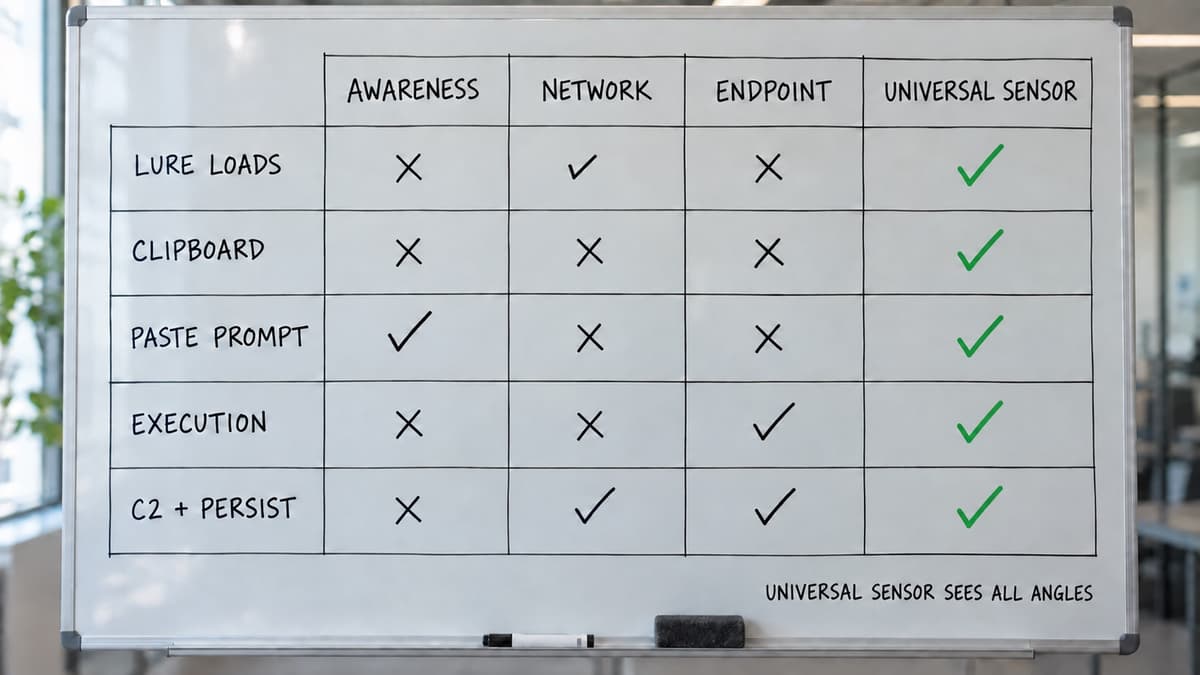
| Stage | Awareness training | Network / DNS blocking | Endpoint detection (EDR/EPP) | Universal Sensor in the browser (SenseOn) |
|---|---|---|---|---|
| Lure page loads | Helps if the person recognises it | Blocks known-bad domains only; misses compromised legitimate sites and fresh domains | Sees nothing yet | Will block known lure domains before the page loads, and will neutralise the fake-verification modal on unknown ones: blur it, overlay a warning, disable interaction |
| Clipboard hijack | Invisible to the user | Invisible | Invisible | Will neutralise the lure before the interaction that triggers the copy |
| Instruction to paste | The one line to teach: no legitimate site ever asks you to paste a command | Invisible | Invisible | Will lock the prompt so the instruction cannot be followed |
| Execution | Too late | Sees the payload fetch, if not on an allowed CDN | Sees explorer.exe spawn PowerShell; the strongest single signal | Outside the browser; hands off to the endpoint agent |
| C2, discovery, persistence | Too late | Sees the beacon | Sees the process tree and scheduled task | Outside the browser |
Two limits. The browser sensor will stop the browser stages, not the whole attack: execution is endpoint work, and the Universal Sensor on the endpoint covers it. And neutralising a modal on an arbitrary page needs broader page access than the base sensor, so that capability will be a gated choice rather than on by default.
What the Universal Sensor will do in the browser
The Universal Sensor is already one agent that unifies identity, endpoint and network DPI telemetry at source on Windows, macOS and Linux. The browser becomes its fourth vantage point, through a managed extension deployed by your existing enterprise browser policy and feeding the same pipeline. For ClickFix it is designed to act in two places.
- Known lure domains will be blocked at the network layer by the browser's declarativeNetRequest engine, which runs below page JavaScript so a hostile page cannot unhook it.
- Unknown lures will be recognised by pattern and neutralised in the extension's isolated world: the fake CAPTCHA or verification pop-up is blurred, a warning is overlaid, and all interaction is disabled.
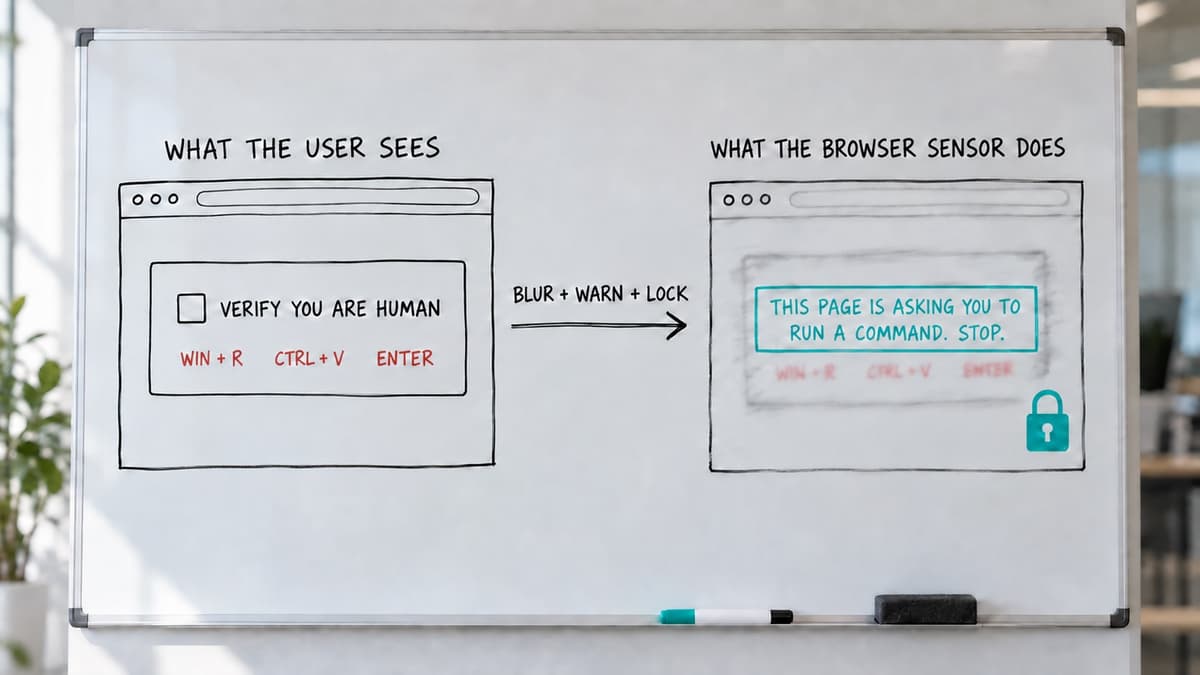
Browser and endpoint events will share a device identity, so a neutralised lure and the PowerShell it would have spawned will appear in one SenseOn investigation. Warning will be the default; the security team will enable blocking and neutralisation per tenant. The browser sensor page has the full design, and the shadow AI guide covers the data-out side of the same tab.
What to do now, without waiting for a sensor
The docs guide has the full list; these five return most in UK estates:
- Turn on PowerShell script block logging. The most valuable artefact for investigating a suspected execution.
- Enforce Constrained Language Mode via WDAC or AppLocker, which removes the .NET and COM access most payloads rely on even when the command runs.
- Block or restrict mshta.exe. The docs guide notes that a WDAC policy blocks it in many configurations even in audit-only mode; test before relying on it.
- Restrict OAuth app consent to admin approval. The only control on the list that touches ConsentFix.
- Teach one line, not a module: no legitimate website, vendor or internal system will ever ask you to paste a command into a system window. Cover the current lure contexts (meeting fixes, document errors, AI-tool onboarding), not just email attachments.
Disabling Win+R is a worthwhile speed bump. It does nothing against FileFix.
If you think someone has run one
Isolate the device first and characterise the payload second. Reset the user's credentials and revoke sessions and refresh tokens, because cached tokens may work elsewhere. Check OAuth grants and inbox rules. Reimage rather than clean. Block the delivery and C2 infrastructure and look for other devices that touched it. Then ask the user what the lure looked like: it is the fastest route to related exposure and to awareness content that helps.
Frequently asked questions
What is a ClickFix attack? A social engineering technique in which a web page shows a fake error or verification prompt and instructs the visitor to paste and run a command that the page has silently copied to their clipboard. The command installs malware or, in the ConsentFix variant, grants a malicious app OAuth access.
Is a fake CAPTCHA the same as ClickFix? The fake CAPTCHA is the most common ClickFix lure. Fake browser updates, fake Windows updates, fake meeting "fixes", fake document errors and fake macOS password prompts are others. The mechanism underneath is the same.
Can a browser extension stop ClickFix? It can stop the browser stages: blocking known lure domains before they load and neutralising the fake prompt so the user cannot follow it. It cannot see the execution stage, which happens in PowerShell or Terminal outside the browser; that is the endpoint agent's job. Both are needed.
Does disabling Win+R stop ClickFix? It stops the original variant. FileFix targets the File Explorer address bar instead, and macOS variants use Terminal or Script Editor. Treat it as one control among several.
What is FileFix? A ClickFix variant that instructs the victim to paste into the File Explorer or Finder address bar rather than the Run dialog or a terminal, specifically to defeat policies that only disable Win+R.
Sources and further reading
- SenseOn Docs, ClickFix: Recognising and Preventing Fake Fix Attacks
- MITRE ATT&CK, User Execution: Malicious Copy and Paste, Sub-technique T1204.004
- Microsoft Security, "Think before you Click(Fix)" (Aug 2025)
- ESET, Threat Report H1 2025 (PDF, Jun 2025): ClickFix detections grew by 517% between H2 2024 and H1 2025
- Netskope Threat Labs, "macOS ClickFix campaign: AppleScript stealers and new terminal protections" (2026)
- Unit 42, Fix the Click: Preventing the ClickFix Attack Vector (Jul 2025)
- Sansec, "Brevo supply chain attack" and BleepingComputer, "Brevo supply-chain attack injected ClickFix scripts on customer sites" (17 Sep 2026)
- TechCrunch, "ClickFix attacks are tricking Mac and Windows users into hacking themselves" (14 Sep 2026)
- BleepingComputer, "Hackers hijack HBO Max Reddit account to push malware in ClickFix ads" (Sep 2026)
- Frederick Barr-Smith, Xabier Ugarte-Pedrero, Mariano Graziano, Riccardo Spolaor, Ivan Martinovic, "Survivalism: Systematic Analysis of Windows Malware Living-Off-The-Land", IEEE Symposium on Security and Privacy, 2021, https://doi.org/10.1109/SP40001.2021.00047
- Meng-Han Tsai, Chia-Ching Lin, Zheng-Gang He, Wei-Chieh Yang, Chin-Laung Lei, "PowerDP: De-Obfuscating and Profiling Malicious PowerShell Commands With Multi-Label Classifiers", IEEE Access, 2022, https://doi.org/10.1109/ACCESS.2022.3232505 (open access)
How SenseOn writes, checks and corrects its content: editorial standards.
